


Joist Invoice & Estimate App
4.64.85K Reviews
App Specs
- Version
- 3.82.1
- Updated On
- License
- Free
- Downloads
- 1,000,000+
- Developer
- Joist Software Inc.
- Categories
- Business
- Platform
- Android, iOS
Screenshots
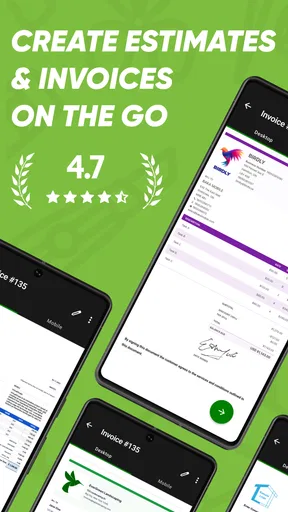
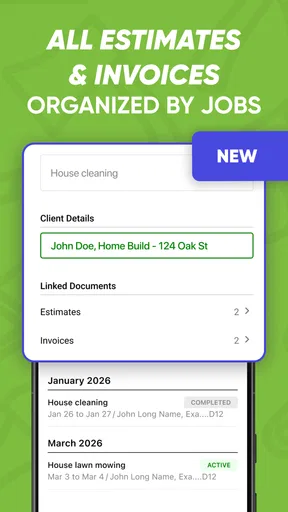
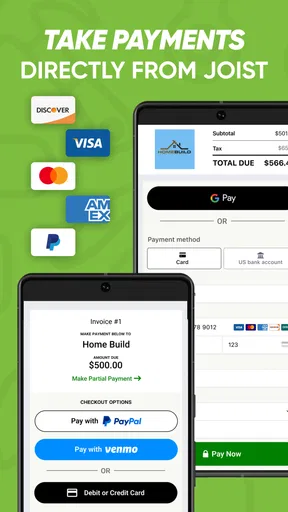
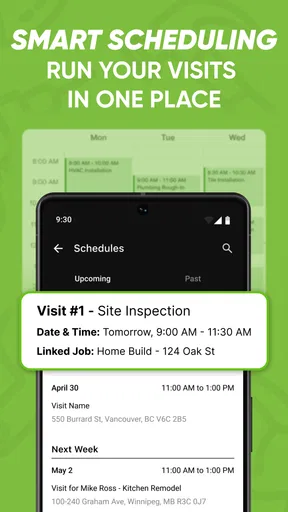
 Analysis by AppCompare
For a contractor, a quote that sits unfinished on a phone can delay more than paperwork: it can leave a client waiting while the next job is already calling. I like the idea of handling estimates and invoices from the same place, and Joist Invoices for Contractors is built around that practical, job-focused need. It is a free business app from Joist Software Inc., with optional in-app purchases, so the sensible question is not simply whether it can make a document. It is whether that focused workflow is useful enough for the way you run your work.
Where a mobile estimate can save a workday
Picture finishing a visit to a customer’s home, discussing the work, and needing to send a clear estimate before moving on to the next appointment. A dedicated invoicing app can make that handoff less dependent on remembering details later or rebuilding a document from scratch at night. The useful habit is to capture the scope and costs while the conversation is fresh, then review the estimate carefully before sending it. That last check matters: speed helps only when the document still reflects what you agreed.
The same workflow is helpful when a customer approves a job and the estimate needs to become the basis for billing. Keeping those steps together can reduce duplicate typing and make it easier to follow the money owed. For a small contractor who handles customer communication, estimates, and invoices personally, this kind of continuity may be more valuable than a long list of advanced business tools.
I would treat the phone as a convenient place to prepare and track routine paperwork, not as a reason to stop checking the details. A clean template cannot decide whether labor, materials, or the work description have been entered correctly. Before sending anything, I’d compare the line items with my notes and make sure the customer can understand what the estimate covers. That simple review is especially worthwhile when a job has changed since the first visit.
What the free starting point does—and does not—settle
The app is free to download, and that makes it approachable if you want to see whether a mobile estimating and invoicing routine suits your business before committing to a paid option. In-app purchases range from $7.99 to $309.99 per item. That is a broad span, so I would check the current purchase details in the app and compare them with the specific tools you expect to use rather than assuming every useful function is included at no cost.
Joist has a 4.7 average from around 13,000 ratings, and it has been available since 2014. Those figures suggest that it has found an audience over time, but they should not replace a practical test with your own job types and paperwork. The current version is 3.68.1, and the app is rated for everyone. It has over 1 million installs, which gives a sense of its reach without telling you whether its workflow fits a particular trade.
For me, the best way to judge its value is to begin with a normal estimate and invoice cycle, then notice where the app genuinely saves effort. If it makes routine documents easier to prepare and follow up, the free access may be enough to establish that benefit. If you are considering an in-app purchase, first identify the exact task it would improve and decide whether that task comes up often enough to justify paying for it. Avoid buying on the assumption that a larger package automatically means a better fit.
Worth Reading Before You Choose

EA SPORTS FC Mobile 26 Is a Bigger Football Game, but It Takes Time

Flipboard Shows What News Apps Must Do Beyond the Feed

Switching to Android Auto Means Rethinking Your Driving Routine

Google Calendar Makes a Crowded Week Easier to Manage

Ludo King Makes the Most of the Minutes Between Plans

Baby Panda World Brings Quick Play to Modern Phones, but Its Game Library Feels Busy
What is Joist Invoices for Contractors?
First things first, let’s talk about what Joist Invoices for Contractors really is. It’s a nifty little app designed to help contractors and freelancers manage invoices, estimates, and payments. Think of it as your personal assistant that doesn’t require coffee breaks. You can create professional-looking invoices and estimates in a jiffy, and even accept payments directly through the app. If you’re in the contracting business, this app might just be your new best friend.
Setting Up and Getting Started
Getting started with Joist is surprisingly easy. You download the app, set up your business profile, and you’re good to go. The interface is user-friendly and intuitive, which is a relief because, let’s face it, we don’t have time to read long manuals. The app guides you through the process, making it almost impossible to mess up. Within minutes, I was creating my first invoice and, honestly, it felt like a breeze.
For a less frustrating setup, I’d have a few basics ready before creating the first document: the business details you want customers to see, a consistent way to describe common jobs, and the terms you normally discuss with clients. This is not busywork; it prevents each estimate from becoming a fresh writing exercise. Reusing clear wording for recurring tasks also makes it easier for a customer to compare a quote with the final invoice.
If you work across several kinds of jobs, take a moment to decide how you want to name similar services before building up a collection of documents. For example, vague entries can be hard to interpret weeks later, while a short description tied to a specific task makes a record more useful to both you and the customer. A template speeds up the layout, but consistent descriptions are what make the paperwork easy to understand.
Features That Stand Out
This app is packed with features that make managing your business a whole lot easier. Here are a few that stood out to me:
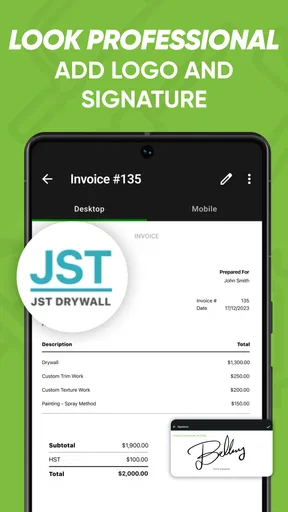
- Customizable Templates: You can create invoices that reflect your brand by customizing templates. Add your logo, change colors, and make it your own.
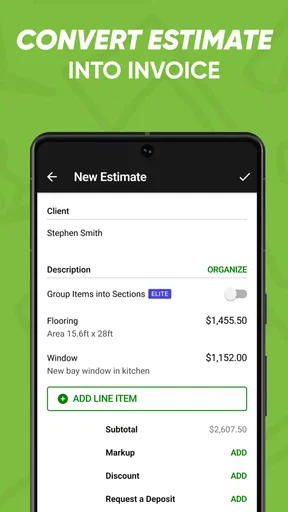
- Estimates and Quotes: Quickly send estimates to clients, and once approved, convert them into invoices without breaking a sweat.
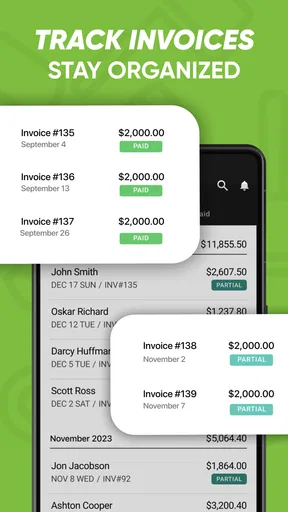
- Payment Tracking: Keep track of paid and unpaid invoices with ease. The app sends reminders to clients, so you don’t have to play the bad guy.
- Mobile Payments: Accepting payments has never been easier. Clients can pay directly through the invoice using a credit card or bank transfer.
The estimate-to-invoice path is the feature I would put to work first. When a customer accepts a quote, carrying its details into the invoice can cut down on re-entry and reduce the chance that the final bill drifts away from the agreed scope. I would still check any changes made during the job before sending the invoice; the shortcut is most helpful when the original estimate remains an accurate record of what was approved.
Payment tracking is also more useful when it becomes part of a routine rather than something you check only after cash flow feels tight. I’d review outstanding invoices at a regular point in the week, then use reminders thoughtfully. A prompt can take the awkwardness out of remembering to follow up, but a personal message may be more appropriate if there is a disagreement, a partial payment, or a customer who needs clarification.
One practical trade-off with mobile payments is that convenience for the customer does not automatically tell you what the full payment process will cost or whether it suits your usual way of collecting money. Before making it your default, look at the terms shown for the payment method and consider how your clients prefer to pay. If most customers use another route, the in-app option may be helpful as an alternative rather than the center of your workflow.
The User Experience
The app runs smoothly and doesn’t suffer from the lag that plagues many other business apps. It’s optimized for both Android and iOS, so it doesn’t matter if you’re team Apple or team Android. The navigation is straightforward, and even a tech rookie would find it manageable. Plus, the customer service is top-notch. I had a couple of questions, and their support team was quick to respond and super helpful.
For contractors who are often away from a desk, a phone-first approach can be a genuine advantage: paperwork can happen close to the customer conversation instead of being postponed until the end of the day. That does not mean every task is best done on a small screen. If you regularly prepare complex estimates, compare many material costs, or need to review a long set of records at once, a larger screen or a more comprehensive bookkeeping setup may feel more comfortable.
Another useful habit is to treat each sent estimate as a business record, not just a message that has left your phone. Keep your own notes about changes agreed verbally, and make sure the final document reflects those changes before billing. An app can help organize the paperwork, but it cannot replace a clear conversation about scope, timing, and what happens if the job changes.
Room for Improvement
No app is perfect, and Joist Invoices for Contractors is no exception. One area that could use a little polish is the reporting feature. While it does offer basic insights into your invoices and payments, I found it a bit lacking compared to some of the more robust accounting software out there. For those of us who like to dive deep into analytics, this might feel a bit limited.
That distinction matters if you are deciding whether Joist should be your whole back office or one useful part of it. A focused invoicing tool is suited to creating customer documents and keeping an eye on what has been paid. A full accounting product is usually a better choice when your regular work depends on broader financial reporting, detailed bookkeeping, or reconciling the many moving pieces of a business. I would not choose Joist alone on the assumption that basic invoice insights replace that wider work.
There is also a process trade-off: putting estimates, invoices, and payment follow-up in one app is convenient, but it makes consistency important. If you use separate systems for customer records or bookkeeping, decide which one is the authoritative place for each piece of information. Without that small bit of discipline, it is easy to update one record and forget another. A simple routine for reviewing sent invoices and recording changes can prevent the convenience of mobile paperwork from turning into scattered records.
Joist is not the right fit for every business simply because it is designed with contractors in mind. A freelancer who rarely sends estimates may not gain much from a dedicated quoting workflow. A larger operation with several people needing coordinated access, extensive reporting, or a more elaborate accounting process may prefer a broader business platform. And if you are satisfied with existing invoicing software, switching is worthwhile only if Joist solves a real irritation in your current routine.
Final Thoughts
At the end of the day, Joist Invoices for Contractors does exactly what it promises. It simplifies invoicing and payment collection, freeing up your time to focus on what you do best—getting the job done. Sure, there are a few areas that could use a touch-up, but the benefits far outweigh the drawbacks. If you’re tired of the paperwork grind and looking for a straightforward solution, this app is definitely worth a try.
My recommendation is strongest for a solo contractor or small operation that wants a straightforward way to move from estimate to invoice and keep track of follow-ups from a phone. I would start with a real, ordinary job rather than trying to migrate every old record immediately: prepare an estimate, check how it reads to a customer, and see whether the invoice stage feels simpler afterward. That trial gives you a more useful answer than judging the app by a template alone.
If you need a complete accounting system, prefer to do all financial work on a computer, or rely on detailed business reports, I would compare it with a broader alternative before changing your process. If your main frustration is preparing customer-facing estimates and invoices while working on site, Joist has a clearer case. The app’s free access makes it possible to explore that fit, while its in-app purchases mean I’d verify the relevant purchase terms before treating any paid option as essential.
So, there you have it. My take on Joist. Give it a whirl and see if it makes your work life just a little bit easier. Who knows, it might just be the tool you didn’t know you needed.
Pros
- User-friendly interface for quick setup.
- Customizable templates enhance professionalism.
- Integrated payment options streamline transactions.
- Supports multiple currencies for global use.
- Efficient client management and tracking tools.
Cons
- Limited free version features available.
- Occasional syncing issues reported.
- No offline mode for remote areas.
- Subscription costs can be high for startups.
- Some users experience slow customer support.
FAQs for Joist Invoice & Estimate App
What features does Joist Invoices for Contractors offer?
Joist Invoices for Contractors provides a comprehensive set of features tailored for construction professionals. Users can create and send estimates and invoices, manage projects, track expenses, and accept payments directly through the app. It also offers client management tools and integration with QuickBooks for streamlined accounting.
Is Joist Invoices for Contractors suitable for small businesses?
Yes, Joist Invoices for Contractors is designed to cater to both small and medium-sized businesses. Its user-friendly interface and robust features make it an excellent choice for contractors looking to efficiently manage their billing and project tracking without needing extensive accounting knowledge.
Does Joist Invoices support multiple currencies and languages?
Joist Invoices supports multiple currencies, making it ideal for contractors working internationally or with clients from different countries. However, the app primarily operates in English. Users should check the app's settings to confirm the availability of specific currencies they need for their business operations.
How secure is the data stored in Joist Invoices?
Joist Invoices employs industry-standard security measures to protect user data, including encryption and secure servers. While the app ensures data privacy, users are encouraged to regularly update passwords and enable any available two-factor authentication features to enhance security further.
Can Joist Invoices be integrated with other financial tools?
Yes, Joist Invoices offers integration with popular financial tools like QuickBooks, which helps in seamless data transfer and accounting management. This allows contractors to synchronize their financial data and streamline their bookkeeping process, saving time and reducing errors.


